

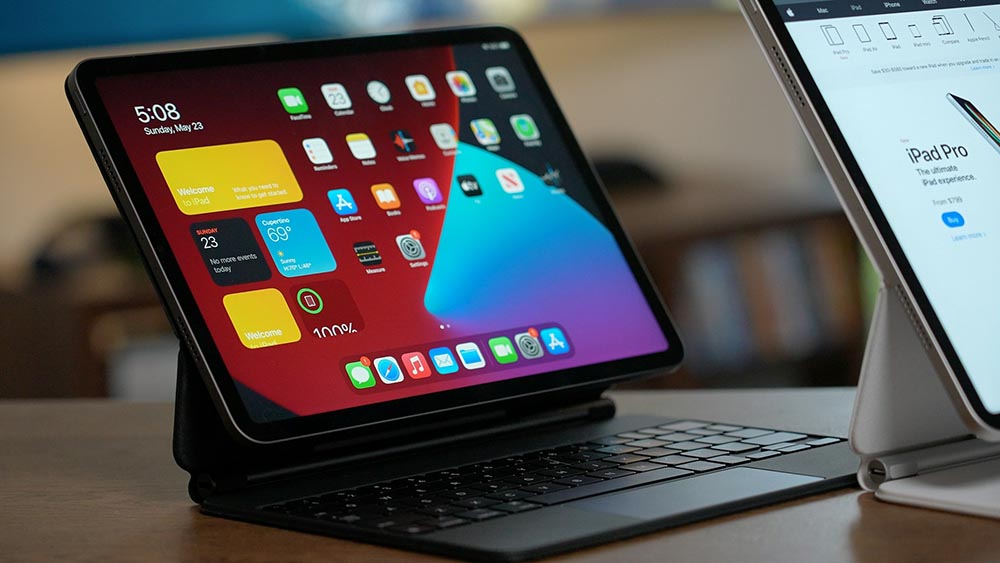
Introduction — Why Desk Tools Should Disappear Into the Background
Goal: Set the context, build credibility, introduce the central argument.
The 2026 hybrid work backdrop:
- Most people juggle two to three devices a day — iPad, laptop, phone
- Bouncing between home and office means constantly setting up and tearing down the same workspace
- The “more tools equals more productivity” mindset has started backfiring
The core argument:
- The best desk tools aren’t new gadgets — they’re the ones that make the devices you already own work better together
- Real productivity gains come from fewer steps, less friction, faster context switches
- A line that’s been floating around communities like Reddit sums it up well: “less friction, fewer tools”
Scope of this piece:
- Covers iPad desk setups, charging solutions, phone accessories, and the software that ties it all together
- Hardware examples reference the ESR ecosystem (iPad keyboard case, magnetic mouse, 3-in-1 charger, stand case), but swap in whatever brand you already trust
- Structure: each section opens with a problem or scenario, then walks through a tool category and a concrete example
Guiding Principle — Tools Should Cut Friction, Not Add to It
Goal: Establish a shared filter readers can apply throughout the rest of the piece.
The familiar frustration:
- Duplicate setups (home office, work desk, the bag you carry) — each one demanding its own cables and peripherals
- Too many single-purpose gadgets
- Mental overhead from managing tools instead of just getting work done
The two-question test for any tool:
- Does it remove steps from my current routine?
- Does it work just as well at my desk as it does on the move?
Transition: Every section below answers those two questions.
Tool Category #1 — iPad Keyboard Cases (Turn Your Tablet Into an Actual Workstation)
The scenario
A growing number of workers have ditched the laptop entirely, using an iPad Pro or Air as their only productivity device. Others run the iPad as a second screen, a meeting display, or a note-taking station alongside a laptop. The catch: the iPad is great out of the box for consuming content, but writing long documents, managing email, or jumping between apps still calls for a real typing setup.
What to look for
- Typing comfort: key travel and layout close to laptop standards
- Stability: does it hold steady on a desk, on your lap, on a tray table?
- Mode flexibility: can you switch from typing to sketching or annotating without removing the case?
- Weight trade-off: a keyboard case shouldn’t end up heavier than the laptop it’s replacing
Real-world example — detachable keyboard cases (e.g., the ESR Shift Keyboard Case)
- Detachable keyboard plus a standalone case → type at your desk, read on the couch, no case-swapping required
- Multi-angle stand (typing angle / 20° drawing angle / portrait mode) → covers writing, annotating, and reading vertical content
- Large trackpad with Bluetooth/magnetic connection → navigation that feels close to a laptop
Comparative note: Apple Magic Keyboard users can weigh detachable cases against it on drawing angle and how quickly the keyboard pops free — different use cases, different trade-offs.
Compatibility reminder: always check fit against your exact iPad model, especially if you’re already eyeing the next generation.
Tool Category #2 — Magnetic Wireless Mice (One Mouse, Every Device)
The scenario
Daily commuters carrying both an iPad and a laptop end up juggling two completely different input methods. Regular mice rattle around in bags, need their own pouch, and get left behind. Re-pairing Bluetooth mid-day breaks your rhythm.
What to look for
- Multi-device Bluetooth pairing: switch between iPad and laptop (Mac or Windows) without re-pairing
- DPI range: works for document-heavy tasks as well as creative or design work
- Carrying solution: does the mouse have a built-in way to stay attached, or do you need a separate pouch?
Real-world example — magnetic wireless mice (e.g., the ESR MagMouse)
- Magnetically attaches to your laptop lid → no more mouse rattling around in your bag, no separate pouch needed
- Built-in USB-C charging cable → one less cable to carry
- Pairs naturally with an iPad keyboard case for anyone running the iPad as a main workstation
Practical note: magnetic mice are especially handy in flex-office environments, where you’re moving between meeting rooms and don’t want to unpack your whole setup every time.
Tool Category #3 — 3-in-1 Charging Stations (One Base, Zero Cable Chaos)
The scenario
A typical knowledge worker’s desk has three to four cables in play — phone, earbuds, watch, sometimes an iPad too. Multiple power bricks crowd the power strip and eat into keyboard/mouse space. Then there’s the classic “phone died mid-meeting” problem: you owned four chargers, and none of them were where you needed them.
What to look for
- Output standards: Qi2, MagSafe, USB-C PD — make sure your devices are actually covered
- Thermal management: does charging slow down, or does the device overheat, during a four-hour video call?
- Footprint: a fixed desktop unit or a foldable, travel-friendly version — which matches how you actually work?
Real-world example — 3-in-1 charging stations (e.g., the ESR 3-in-1 with CryoBoost)
- One base charges iPhone, AirPods, and Apple Watch at the same time
- Qi2 and native MagSafe versions offer different power levels — worth noting if you’re on an iPhone 15 or later, or also charging an iPad
- Active cooling (CryoBoost) keeps charging at full speed through long work sessions, particularly useful when the phone has been running video calls for hours
Buying tips:
- Pay attention to cable management and stand height — it affects the space under your keyboard
- Shared desks / flex office: go foldable, so you get portability without giving up desktop ergonomics
Tool Category #4 — Phone Stand Cases (Video Calls Without a Tripod)
The scenario
Most video calls made from a phone end with the device propped against a mug, a book, or the laptop itself. Standalone phone stands eat up desk space; tripods are overkill for a Zoom call. The goal here is hands-free positioning that disappears the moment you don’t need it.
What to look for
- Stand angle range: does it support portrait (video calls) and landscape (watching reference content)?
- MagSafe / wireless charging compatibility: does the stand mechanism block the charging coil?
- Protection vs. bulk trade-off: a stand case still needs to survive drops without feeling like a brick
Real-world example — phone case with a built-in camera stand (e.g., the ESR Stash Stand Case)
- The camera-area module flips out into a stable stand → portrait for FaceTime/Zoom, landscape for reference video
- Deploys in under 2 seconds → works in a coffee shop, at a client’s office, or in a hotel room
- Zero extra bulk: the stand is the case
For readers who want the full rundown of phone case types before buying → [internal link: “Do You Actually Need a Phone Case?”]
Tool Category #5 — Productivity Software (Where Hardware Meets Workflow)
Goal: Balance out the hardware-heavy sections; mirrors the structure of reference-style roundups (think PCMag-style format).
Three software categories worth considering
Task and project management
- Tools like Notion, Todoist, or Akiflow
- Cuts down the back-and-forth between email, chat, and to-do lists
- Works equally well on iPad and desktop, reinforcing the hardware setup above
Communication and collaboration
- Slack, Microsoft Teams, Zoom
- A phone stand case makes spontaneous video calls from your phone genuinely effortless
- A 3-in-1 charger keeps every device alive through back-to-back meetings
Focus and time-blocking tools
- Apps that put hard limits on distractions and protect deep-work blocks
- Pair especially well with a single-device iPad setup (fewer notifications, more focus)
Hardware × software synergies
| Hardware | Paired App | Friction Removed |
| iPad keyboard case | Notes / Craft / Notion | Long-form writing without a laptop |
| 3-in-1 charger | Teams / Slack | Every device stays charged all day |
| Phone stand case | Zoom / FaceTime | Hands-free calls, no separate tripod |
| Magnetic mouse | Any multi-window app | Smooth cursor control across iPad and laptop |
Bringing It Together — A Flexible Desk Kit for 2026
Goal: Tie the individual tools into one coherent system; show how they work together rather than in isolation.
At your desk
- iPad + keyboard case + magnetic mouse = your main workstation
- The 3-in-1 charging station keeps your phone, watch, and earbuds topped up without a tangle of cables
- The phone stand case handles video calls and reference content while your hands stay on the keyboard
On the move
- The keyboard detaches — the iPad goes into the bag on its own
- The mouse snaps onto the laptop lid — no separate pouch needed
- The charging station folds down into travel mode
- The stand case is already with you — nothing extra to pack
The logic behind it
The point isn’t to own every tool on this list. It’s choosing a small set of tools that work together as a system — cutting down on decisions, cables, and the constant shuffling between devices.
- Budget or brand preference might steer you toward different specific products — the selection criteria in each section still apply
- Recommended starting point: identify your biggest day-to-day friction point and fix that one first, rather than overhauling everything at once
Checklist — How to Choose the Right Desk Tools for Your Work Style
Goal: Give readers a quick decision framework; reinforce the “start small” message.
Your hardware reality:
- Primary device: iPad only / laptop only / both
- How many different workspaces do you use in a typical week?
- Shared desk, or a setup that’s yours alone?
Your biggest friction point right now:
- Cable and charging chaos
- Typing experience (keyboard/mouse)
- Video calls and hands-free phone use
- Too much gear to carry between locations
Before you buy anything:
- Does this remove at least one step from my daily routine?
- Will it work just as well on the move as it does at my desk?
- Am I replacing something, or just adding something new?
Conclusion — Simpler Setups, Better Results
- Restate the core argument: the most productive desk in 2026 isn’t the most fully equipped one — it’s the most deliberate one
- The four hardware categories covered (keyboard case, mouse, charger, stand case) were chosen because they tackle the four most common friction points in hybrid work
- Encourage readers to start with one change, not ten
- CTA options: link to individual product review pages / ESR collection page / related articles
Suggested internal links
| Anchor Text | Target Article |
| “Do You Actually Need a Phone Case?” | ESR case buying guide |
| iPad keyboard case comparison | iPad accessory roundup |
| Qi2 vs. MagSafe, explained | Charging standards explainer |
| Best productivity apps for iPad | Software roundup (if available) |