

Before anyone hears a single note, they see the cover.
It’s the first handshake between an artist and a listener, scrolling through a streaming platform in half a second, deciding whether to click. Designing something that captures an album’s sound and mood used to mean hiring a photographer or illustrator who truly understood the music. Now, an AI image generator can translate that same musical concept into a striking visual, straight from a description of the sound itself.
Dreamina, powered by its most advanced image generation model, Seedream 5.0 Pro, is particularly well-suited to this kind of interpretive design work, turning abstract musical ideas into something concrete and visual. Here’s how to actually pull off an album cover that feels like it belongs to your music.

Translating sound into a visual language
Music and image are different senses entirely, which means the real skill here isn’t literal illustration; it’s translation. A driving, aggressive bassline might translate visually into sharp angles and high contrast. A dreamy, reverb-heavy track might translate into soft focus and pastel color washes. Before writing a single prompt, it helps to sit with the music and ask what it would look like if sound became color, texture, and shape.
Genre-specific visual cues worth knowing
Certain genres have developed such strong visual shorthand that leaning into it, rather than avoiding it, often produces stronger results:
- Synthwave and electronic — neon gradients, retro grids, glowing skylines
- Indie folk — natural textures, muted earth tones, handwritten or organic typography feel
- Hip hop — bold graphic contrast, urban settings, strong central figure
- Ambient or lo-fi — soft blur, muted pastels, quiet minimal scenes
Recognizing these conventions doesn’t mean copying them exactly, but understanding them gives you a starting vocabulary to build from or deliberately subvert.

Choosing between literal and abstract concepts
Album covers generally fall into two broad camps. A literal concept features a clear subject, often the artist themselves, styled to match the music’s mood. An abstract concept relies purely on color, texture, and composition to evoke a feeling without a defined subject at all. Neither approach is inherently better, but deciding which direction fits your project changes everything about how you’ll write your prompt.
Your 3-step cover reveal with Dreamina
With your visual direction chosen, here’s exactly how to bring it to life.
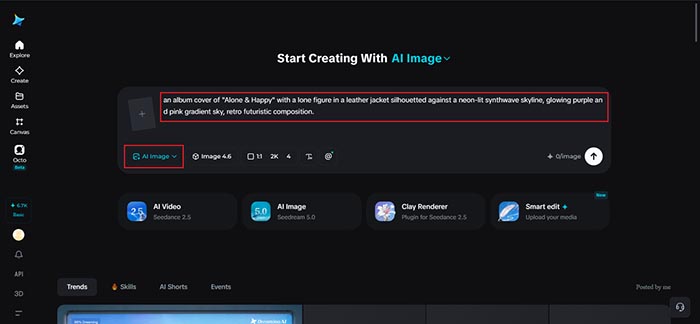
Step 1: Write a text prompt and/or add a reference image
Navigate to Dreamina and write a detailed text prompt describing a person dressed appropriately for your music’s genre and mood, positioned within a scene that matches the sound you’re representing. If you have a reference image capturing a similar aesthetic or era you’re drawing from, upload it to guide the generation further.
For instance: An album cover of “Alone & Happy” with a lone figure in a leather jacket silhouetted against a neon-lit synthwave skyline, glowing purple and pink gradient sky, retro futuristic composition.
Requesting open space for a title keeps the design practical for actual release use.
Step 2: Adjust parameters and generate
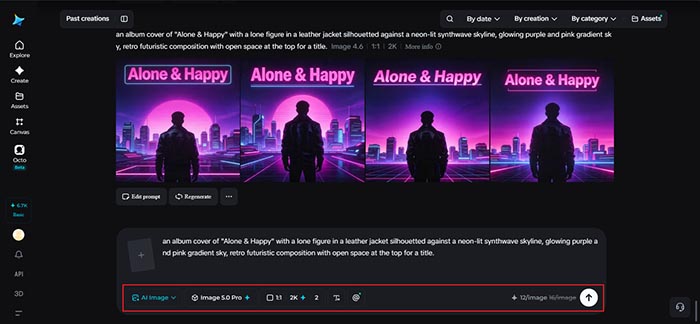
Before generating, set your parameters to match standard album cover format. Choose Image 5.0 Pro, powered by Seedream 5.0 Pro, as your model, then select your aspect ratio, image size, and resolution, using a square aspect ratio to match streaming platform requirements and 2K resolution for crisp detail across every display size. Click Dreamina’s generate icon to produce your cover.
Step 3: Customize and download
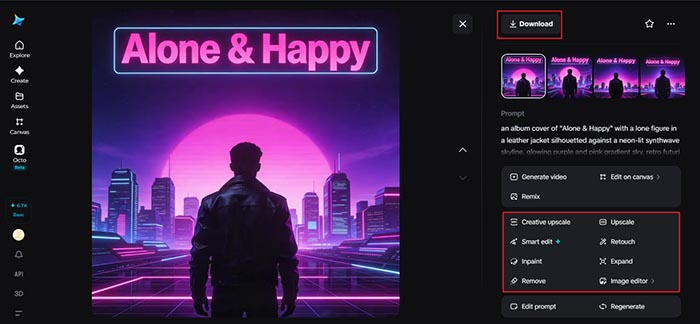
Once your cover generates, refine it using Dreamina’s AI customization tools — inpaint to adjust specific details like lighting or texture, expand to open up space for title text, remove to clean up anything cluttering the composition, and retouch to enhance overall mood and color balance. When it captures the feeling of the music, click the Download icon to save it.
Meet Seedream 5.0 Pro: reading mood before rendering it
Seedream 5.0 Pro has a few features that line up especially well with this kind of interpretive, mood-driven design work.
Deep reasoning generation for abstract briefs
Since a musical concept is inherently abstract rather than a literal description, Seedream 5.0 Pro’s deep reasoning generation matters significantly here. It analyzes your prompt’s intent and visual relationships before producing an image, which helps it interpret a genre-specific mood accurately rather than defaulting to generic imagery.
Multi-layer visual control for flexible layouts
Album art almost always needs to accommodate a title and artist name somewhere. Multi-layer visual control separates the subject, background, and text into independent components, making it simple to adjust or add title space without disturbing the core artwork.
Pinpoint precision editing for mood-specific detail
With point selection, lasso, sketch guidance, and regional controls, pinpoint precision editing lets you fine-tune a specific lighting effect or color detail that’s essential to nailing a genre’s particular visual feel.
2K output for streaming and print alike
Since album covers show up everywhere from tiny streaming thumbnails to physical vinyl sleeves, 2K output quality ensures the fine gradient work and texture central to most album art styles hold up at any size.
Leaving room for title and artist name
Even the most striking cover falls short if there’s nowhere clean to place the album title and artist name. Deciding roughly where this text will sit, often the top third or bottom third of the composition, and requesting that space stay relatively open in your prompt, saves significant rework once you’re ready to add typography.
Building a cohesive visual identity across a discography
If this is one album among several, it’s worth considering how the cover fits within a larger visual identity. Reusing a consistent color family, lighting style, or compositional habit across multiple releases helps listeners recognize an artist’s work at a glance, even before reading a name.
Conclusion
An album cover that actually feels like the music it represents doesn’t require a full creative team, just a genuine understanding of the sound’s mood and the right AI image generator to translate it. With Dreamina and its advanced Seedream 5.0 Pro model, that translation from sound to image becomes a genuinely achievable creative process.
Sit with the music first, choose your visual language deliberately, and let Dreamina design a cover that actually sounds like something.