

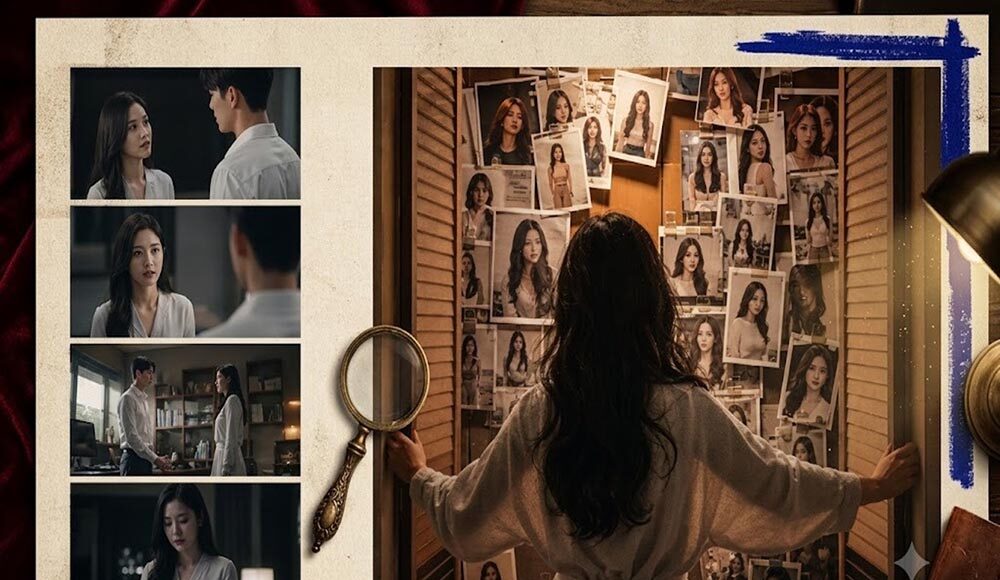
Micro drama is designed for serial consumption, short episodes, characters that are repeated, cold open and cliff hangers that leave viewers wanting something more.
The format is not about one flawless cinematic turn; it’s about being quick and consistent. With the series organized in an AI Drama Studio workflow, Seedance 2.5 has proven to be a powerful asset in creating longer cinematic video beats, which can be beneficial for episode hooks, reveals, and pressure at the end. This is a production guide to create micro dramas using Seedance 2.5, NOT a comparison of production tools.
What You Are Making
A workable micro drama pilot usually includes:
- A clear series premise
- A locked lead character (and optional supporting cast)
- 3–7 short episodes
- One strong hook per episode
- One unfinished question at the end of each episode
It’s not that you’re trying to make a feature film with one prompt. You are creating an episode machine you’d like to repeat.
Step 1: Lock the Series Bible First
Write one-page Bible before any Seedance generation:
- Premise: Whose life is disrupted, and by what?
- Lead look: face, age range, hair, wardrobe silhouette
- World: apartment, office, campus, city night, etc.
- Tone: revenge, romance, mystery, workplace tension
- Do-not-change list: coat color, glasses, scar, hairstyle
If the bible is ambiguous, Seedance will come up with a new lead per episode!
Step 2: Write Episode Cards, Not Random Prompts
For each episode, lock four lines:
- Cold-open question
- Conflict move
- Peak reveal
- Cliffhanger
Example episode card:
Opening: She listens to her voice on a voicemail in an unknown apartment. Conflict: The little girl’s nickname is known to the stranger. Printed photos of her throughout the house were arranged in a closet on the wall that seemed to be the highest point. Cliffhanger: One picture is to be taken tomorrow.
Step 3: Produce Inside a Drama Studio Workflow
Once you’ve made your queen, then it’s time to make some other stuff.Step 3: Make Other Stuff in a Drama Studio Workflow Don’t lose the planning of your episodes, cast references, or chapter order in isolated chats and folders! Drama Studio can be used for serializing structure, and Seedance 2.5 provides motion for each beat.
A practical loop:
- Create or open the series project
- Attach the cast/world references
- Add the episode card
- Board or keyframe the peak moment
- Generate the episode beats with Seedance 2.5
- Approve, then move to the next episode
Step 4: Use Seedance 2.5 for Episode Motion
The best thing about Seedance 2.5 is that it is best used when a directed beat has started already. Prompt with constraints:
- Who is on screen (from the character sheet)
- Where we are (from the world lock)
- What exactly happens in this beat
- Camera move in one sentence
- What must stay identical to earlier episodes
Prioritize Seedance generation on:
- Cold opens
- Reveal moments
- Cliffhanger buttons
The conversation can remain more straightforward in bridging dialogue. Place the model budget on the seconds to retain retention. Since Seedance 2.5 can handle the longer clips when it comes to film (up to about 30 seconds), this allows it to work better than forcing all of the hooks into little pieces. Always beat first, longer generation is not a substitute for story clarity.
Step 5: Continuity Check Before Publishing
After each Seedance output, check:
| Check | Pass |
| Face | Same lead as episode 1 |
| Wardrobe | Same silhouette and colors |
| Location | Same world logic |
| Story | Reveal matches the episode card |
| Hook | Ending still asks an unfinished question |
Reject beautiful clips that break cast identity. In micro drama, continuity is retention.
A Simple 5-Episode Pilot Plan
- Episode 1: establish lead + first disruption
- Episode 2: deepen the threat or desire
- Episode 3: false relief or betrayal turn
- Episode 4: cost becomes personal
- Episode 5: larger cliffhanger into the next batch
Use the same Seedance identity rules for each episode. Don’t update the lead as a new prompt “sounded cooler”.
Prompt Pattern That Travels Across Episodes
Maintain a stable identity block, and only change the action block:
Identity block (reuse): identical woman, short dark hair, navy color outfit, tired eye expression, modern city apartment, consistent face
Action block (changes): She opens closet, camera zooms in on photos of her covering the wall and she freezes.
The use of the identity block is the key to Seedance remaining in a series rather than casting a fresh actor every night.
Common Mistakes
- Starting in Seedance before writing episode cards
- Changing wardrobe language on the cliffhanger shot
- Making every second a visual climax until the episode feels noisy
- Treating each episode as a brand-new project with no shared bible
- Publishing without a continuity pass
FAQ
Is there any need to use Seedance 2.5 on each shot?
No. Use it in areas where motion is most important and/or most visible – hooks, reveals, endings. Continue with light routine bridging, if necessary.
What is the duration of each episode of the micro dramas?
Short enough that they can use to binge but still long enough that they will be able to get one turn and one cliffhanger. Designed for story pressure, not a set flex.
Is it possible to make the entire series using just prompts?
One can do that, but once the bible + episode cards precede the Seedance-fired directed beats, the quality of the series is enhanced.
Final Takeaway
When using Seedance 2.5 to build AI micro dramas, use it as a cinematic episode engine in a drama-studio production loop: lock cast and world, write episode cards, generate episode peak beats, test for continuity, publish episode to rhythm. That’s how Seedance eliminates the “one and done” effect and begins to create an ongoing series that people want to watch.